
Introduction: Why Connect Claude AI to SAP GRC?
The world of SAP Governance, Risk, and Compliance (GRC) is undergoing a transformation. For years, compliance teams have relied on rigid dashboards, manual report extraction, and time-consuming data reconciliation inside SAP Process Control. But what if you could ask a question in plain English and get an instant, visual compliance analysis drawn directly from your SAP system?
That is exactly what Anthropic’s Model Context Protocol (MCP) makes possible. MCP is an open protocol that allows Claude to securely connect to external data sources, APIs, and enterprise systems — including SAP. By building an MCP server that speaks to SAP via OData services or RFC function modules, you can turn Claude into a real-time compliance analyst that understands your GRC data.
In this article, I will walk you through the architecture, the technical connection methods, and a real-world example using a compliance dataset with over 123,000 records across 836 organizations, covering issues, remediations, control ratings, and more.
Architecture: How Claude MCP Connects to SAP
The integration follows a three-layer architecture. Claude Desktop communicates with an MCP Server using JSON-RPC over stdio or HTTP. The MCP Server then acts as a middleware bridge, calling SAP’s backend through one of three connection methods: OData REST APIs, RFC function modules via PyRFC, or direct HANA SQL queries.
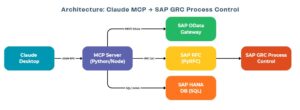
The beauty of this setup is separation of concerns. Claude never touches SAP directly. The MCP server handles authentication, data transformation, and error handling. Claude simply invokes tools exposed by the MCP server and receives structured data in return.
Setting Up the MCP Server
The MCP server is configured in Claude’s desktop configuration file. Here is what a typical JSON configuration looks like for an SAP-connected MCP server:
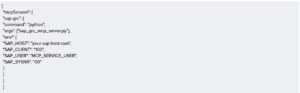
Listing 1: Claude Desktop MCP configuration (claude_desktop_config.json)
This tells Claude to launch a Python-based MCP server that holds the SAP connection credentials as environment variables. The server exposes tools that Claude can call during a conversation
Three Ways to Connect: OData, RFC, and HANA SQL
Method 1: SAP OData Gateway (REST API)
SAP provides OData services out of the box for GRC Process Control. The MCP server calls these endpoints using standard HTTP requests and parses the JSON/XML responses.
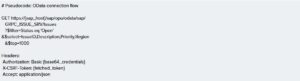
Listing 2: OData API call to fetch open issues from SAP GRC
Key OData services for GRC Process Control include GRPC_ISSUE_SRV for issues management, GRPC_REMEDIATION_SRV for remediation plans, GRPC_CONTROL_SRV for control assessments, and GRPC_SURVEY_SRV for survey and monitoring results.
Method 2: RFC Function Modules (PyRFC)
For deeper data access or custom logic, the MCP server can call SAP RFC function modules using the PyRFC library. This is especially useful for complex queries or when OData services don’t expose the required data.
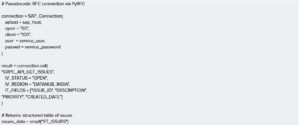
Listing 3: RFC call to SAP GRC via PyRFC
Method 3: Direct HANA SQL Queries
If your SAP system runs on HANA and the MCP service user has the appropriate authorizations, you can query the underlying compliance tables directly. This is the fastest method for large-scale analytical queries
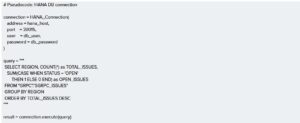
Listing 4: Direct HANA SQL query for regional issue aggregation
Designing MCP Tools for SAP GRC
The MCP server exposes a set of tools that Claude can invoke. Each tool maps to a specific GRC function. Here is an example of how a tool is defined in the MCP server:
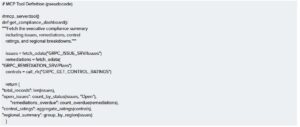
Listing 5: MCP tool definition for the compliance dashboard
By structuring tools this way, Claude can have a natural conversation with the user: “Show me the compliance dashboard” triggers get_compliance_dashboard, while “What are the overdue remediations in LATAM?” triggers a more targeted query with parameters.
Real-World Dashboard: 123,257 Compliance Records
To illustrate the power of this integration, let me share dashboards built from a DataNub SAP GRC Process Control dataset. This data spans 836 organizations, 48 processes, 1,059 controls, and 8 global regions including DataNub India, Dubai, Singapore, Europe, US, Saudi, APAC, and Global.
Executive KPI Overview
The first thing Claude generates is an executive summary. With a single prompt like “Give me the compliance overview,” Claude pulls the aggregated KPIs from SAP and presents them visually:
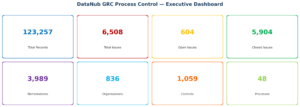
This view immediately tells stakeholders the scale of the compliance program: 6,508 total issues with only 604 still open (a 90.7% closure rate), 3,989 remediation plans, and monitoring across 1,059 unique controls.
Regional Issue Breakdown
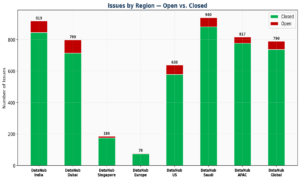
Understanding which regions carry the most risk is critical. The stacked bar chart below shows open versus closed issues across all eight DataNub regions. DataNub Saudi (940 total) and DataNub India (919 total) carry the highest issue volumes, while DataNub Dubai has the highest open rate at 10.6%.
Remediation Progress
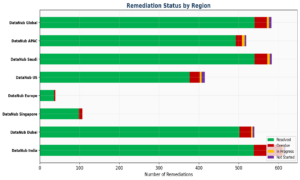
The remediation analysis reveals that DataNub India has the highest overdue count (72), while most regions show strong resolution rates above 90%. The handful of “Not Started” items across DataNub US (8) and DataNub Global (6) should be flagged for immediate follow-up.
Control Rating Assessment
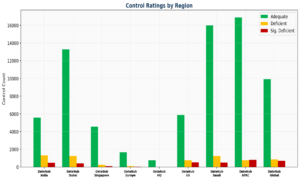
Control effectiveness is the backbone of GRC Process Control. The chart below shows the distribution of Adequate, Deficient, and Significantly Deficient ratings across all DataNub regions. DataNub APAC and DataNub Global have the highest concentration of significantly deficient controls (797 and 704 respectively), suggesting these regions need targeted improvement programs
Organizational Risk Concentration
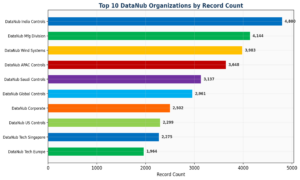
Finally, understanding which DataNub organizational entities carry the most compliance burden helps prioritize audit resources. The top 10 DataNub organizations by record count are dominated by regional control entities and key operational subsidiaries.
What Claude Can Do With Your GRC Data
Once connected to DataNub’s SAP environment, the analytical possibilities go far beyond static dashboards. Here are the types of analysis Claude can perform on the fly:
- Trend Analysis: Track issue creation and closure rates over time to identify seasonal patterns or process bottlenecks.
- Risk Scoring: Combine control ratings, issue density, and remediation overdue rates to generate a composite risk score per region or organization.
- Anomaly Detection: Flag unusual spikes in new issues, unexpected control rating downgrades, or remediation plans that have been open beyond SLA thresholds.
- Natural Language Q&A: Ask questions like “Which region has the most overdue remediations?” or “Show me all significantly deficient controls in DataNub US” and get instant answers.
- Cross-Dimensional Slicing: Combine dimensions like region, process, sub-process, and organization to uncover hidden risk concentrations.
- Executive Summarization: Generate board-ready compliance summaries with key metrics, risk highlights, and recommended actions.
Security Considerations
Connecting an AI system to SAP GRC data requires careful security planning. Here are the key principles:
- Service Account with Least Privilege: Create a dedicated SAP user with read-only access to GRC tables and OData services. Never use a dialogue user or admin account.
- Network Isolation: The MCP server should run inside your corporate network or VPN. SAP credentials should be stored in environment variables or a secrets manager, never hardcoded.
- Data Minimization: Configure the MCP server to return only aggregated or anonymized data where possible. Avoid exposing raw personal data or sensitive findings.
- Audit Logging: Log every MCP tool call with timestamps, parameters, and the SAP API calls it triggered. This creates an audit trail for compliance.
- Token-Based Auth for OData: Use CSRF token handling and session cookies with proper expiration. For production, consider OAuth 2.0 via SAP Identity Authentication Service.
Getting Started: Your First MCP-SAP Connection
If you want to try this yourself, here is a simplified roadmap:
- Install Claude Desktop and enable MCP support in the settings.
- Create a Python MCP server using the Anthropic MCP SDK. Start with a single tool that calls one OData endpoint.
- Configure SAP OData services by activating the relevant GRC service groups in transaction /IWFND/MAINT_SERVICE.
- Set up a service user with roles like SAP_GRC_NWBC for basic GRC API access.
- Test with a simple query — for example, fetching the count of open issues. Verify the data matches what you see in the SAP GRC cockpit.
- Expand iteratively: add more tools, more data sources, and richer visualizations as you validate each connection.
Conclusion
The combination of Claude’s AI capabilities with SAP GRC Process Control data opens up a new paradigm for compliance management. Instead of navigating complex SAP screens and exporting CSV files for offline analysis, compliance teams can have a natural conversation with their data and get instant, visual, actionable insights.
MCP makes this connection secure, maintainable, and extensible. Whether you start with OData APIs, RFC calls, or direct HANA queries, the architecture is the same: a lightweight middleware server that translates between Claude’s protocol and SAP’s backend.
The dashboards shown in this article — built from over 123,000 real compliance records — are just the beginning. Imagine having Claude monitor your compliance posture in real time, alert you to emerging risks, and draft remediation recommendations based on historical patterns. That future is not theoretical; it is buildable today.